Threads and Concurrency
Table of Contents
- Doing Several Things at Once
- What Is a Thread?
- Threads vs. Processes
- Concurrency vs. Parallelism
- Why Apps Freeze
- The Danger of Sharing: Race Conditions
- Locks, and Their Own Problems
- How Languages Handle This
- Try It Yourself
1. Doing Several Things at Once
Think about a music app. At the same moment, it needs to:
- play the current song without any gaps
- respond when you tap a button
- download the next song in the background
- update the progress bar every second
If the app could only do one thing at a time, the music would stop every time you scrolled the playlist. Programs need a way to do several things at the same time, inside one process. That's what threads are for.
2. What Is a Thread?
A thread is a single sequence of instructions being run — one "line of work" inside a process.
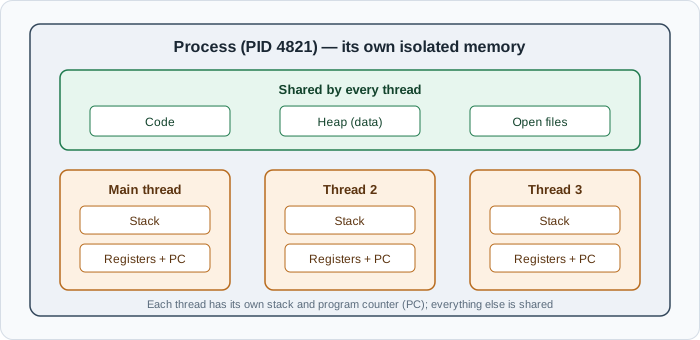
Every process starts with one thread, called the main thread. It can then create more threads, each running its own part of the program. Each thread has its own:
- program counter — its own bookmark in the code
- registers — its own CPU state
- stack — its own record of which functions it's in and their local variables
But all threads in a process share everything else: the same code, the same heap memory, and the same open files.
A useful picture: a process is a restaurant kitchen, with its equipment and ingredients. Threads are the cooks. Each cook works on their own dish, but they all share the same fridge, stove, and counter.
3. Threads vs. Processes
| Process | Thread | |
|---|---|---|
| Memory | Its own, isolated | Shared with other threads in the same process |
| Creating one | Slower, uses more memory | Faster, lighter |
| If it crashes | Other processes are safe | Usually takes the whole process down |
| Communicating | Needs deliberate IPC (files, network, pipes) | Can simply read and write shared variables |
Threads are cheaper and can share data easily — that's their strength. Processes are isolated and safer — that's theirs. This trade-off is why Chrome uses separate processes for tabs (safety), while each tab uses several threads inside it (speed).
The OS scheduler from chapter 7 actually schedules threads, not processes. Each thread takes its turn on a CPU core.
4. Concurrency vs. Parallelism
These two words are often confused:
- Concurrency means dealing with several tasks during the same period of time — by switching between them. Only one might be running at any exact instant.
- Parallelism means literally doing several tasks at the same instant, on different CPU cores.
A single cook who stirs the soup, then chops onions, then checks the rice, then stirs the soup again is working concurrently. Three cooks each doing one of those jobs at the same moment are working in parallel.
On a computer:
- One core can give you concurrency (by rapidly switching threads) but not parallelism.
- Multiple cores give you real parallelism — this is where the extra cores from chapter 3 finally pay off.
Most of the time, concurrency is what you need — especially when tasks spend their time waiting (for the disk, the network, the user). Parallelism matters when there's a lot of pure calculation to split up, like encoding video or processing a large image.
5. Why Apps Freeze
In almost every app with a user interface, one thread — the main thread, often called the UI thread — is responsible for drawing the screen and responding to clicks and key presses.
If that thread gets stuck doing something slow — reading a huge file, waiting for a slow network request, or calculating something heavy — it can't redraw the screen or respond to you. The app looks frozen. On Windows you see "(Not Responding)" in the title bar; on macOS, the spinning rainbow cursor.
The fix is always the same idea: keep slow work off the main thread. Hand it to a background thread (or use asynchronous code, covered in the next chapter), and let the main thread keep the interface smooth.
This applies to servers too. A server that handles each request on one thread and blocks while waiting for the database can only serve a few users at once.
6. The Danger of Sharing: Race Conditions
Sharing memory between threads is powerful — and dangerous.
Imagine a bank account balance of $100 stored in a shared variable. Two threads each try to deposit $50 at the same time. Each deposit takes three steps:
- Read the current balance
- Add 50
- Write the new balance back
If the steps interleave badly:
| Time | Thread A | Thread B | Balance in memory |
|---|---|---|---|
| 1 | Reads 100 | 100 | |
| 2 | Reads 100 | 100 | |
| 3 | Adds 50 → 150 | 100 | |
| 4 | Adds 50 → 150 | 100 | |
| 5 | Writes 150 | 150 | |
| 6 | Writes 150 | 150 |
Two deposits of $50, and the balance went up by only $50. One deposit simply vanished.
This is a race condition: the result depends on the exact timing of threads, which you don't control. The scheduler might interleave them differently every run. So the bug appears sometimes — maybe once in ten thousand runs, or only under heavy load in production — which makes race conditions among the hardest bugs to find.
The same problem happens outside of threads, too — for example, two requests to your API updating the same database row at the same time.
7. Locks, and Their Own Problems
The classic fix is a lock (also called a mutex, from mutual exclusion). Before touching the shared data, a thread takes the lock; when it's done, it releases it. Only one thread can hold the lock at a time, so the read–add–write steps can't interleave.
It's like a single key to a bathroom: whoever holds the key goes in; everyone else waits.
Locks bring their own risks:
- Slowdown — threads spend time waiting for each other.
- Deadlock — Thread A holds lock 1 and waits for lock 2, while Thread B holds lock 2 and waits for lock 1. Both wait forever, and the program hangs.
Because this is so easy to get wrong, a good general rule is: share as little as possible between threads.
8. How Languages Handle This
Different languages take different approaches, and you'll meet them all:
- Java, C#, C++ — you create and manage threads directly, and use locks to protect shared data.
- Go — makes it very cheap to run thousands of lightweight tasks called goroutines, and encourages passing data between them through channels instead of sharing memory.
- JavaScript (browsers and Node.js) — your code runs on a single main thread, so two pieces of your code never run at the exact same moment, and classic data races can't happen in normal code. Instead, JavaScript handles lots of waiting through asynchronous code and an event loop. (Node.js does use extra threads internally, and you can create worker threads for heavy calculations.)
- Python — has threads, but its main implementation historically allowed only one thread to run Python code at a time (the "GIL"), so parallel calculation usually uses multiple processes instead.
Why JavaScript works so well with just one thread comes down to how computers handle input and output — the subject of the next chapter.
9. Try It Yourself
-
Count threads.
- Windows: Task Manager → Performance → CPU. Under the graph you'll see the total Processes and Threads count.
- macOS: Activity Monitor → CPU tab. At the bottom you'll see total Threads and Processes; you can also add a Threads column by right-clicking a column header.
- Linux: run
top -Hto list threads instead of processes.
Notice there are usually far more threads than processes.
-
See parallelism. On Windows, right-click the CPU graph → Change graph to → Logical processors. On macOS, open Window → CPU History. Start something heavy (a video export, a big game, or a long compile) and watch several cores light up at once.
-
See a freeze. Next time an app shows "Not Responding" or the spinning cursor, you know what's happening: its main thread is stuck.
Threads let a program do many things at once, and most of those things turn out to be waiting. Next, let's look at what they're waiting for.
Buy Me a Coffee
Found this tutorial helpful? Consider buying me a coffee to support more free content!