Database Integration (Prisma + PostgreSQL)
Table of Contents
- Why a Real Database
- Installing Prisma
- Defining the
TaskModel - Running the Migration
- A
PrismaService - Rewriting
TasksServiceAgainst Prisma - Beginner Pitfalls
Note: this part targets Prisma v7, the current stable release — not v6 (the previous stable line) and not v8 (still release-candidate only at the time of writing). Pin versions explicitly as shown below, since a bare
npm install prismacan resolve to whichever line is taggedlateston npm at the time you run it.
1. Why a Real Database
Every task created so far lives in a plain array inside TasksService —
it's gone the moment the server restarts. A real API needs data that
survives restarts and can be queried properly. This crash course uses
PostgreSQL as the database and Prisma as the ORM — the same combo
used in the paid, live cohort this crash course previews — so what you
build here transfers directly.
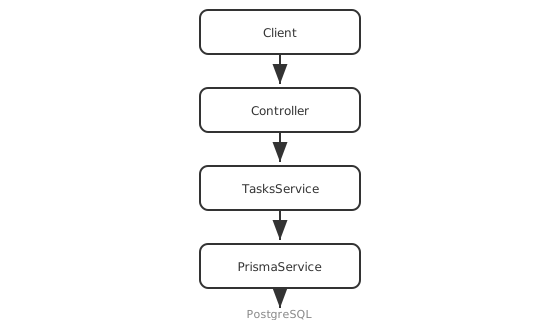
- Controller — unchanged from Part 3.
- Service — same public methods as Part 4, now backed by Prisma instead of an array.
- PrismaService — wraps Prisma's generated client so it can be injected like any other provider.
- PostgreSQL — where the data actually lives.
2. Installing Prisma
You need a running PostgreSQL instance. Rather than installing Postgres on
your machine, run it in Docker — create a docker-compose.yml in the
project root:
# docker-compose.yml
services:
  db:
    image: postgres:17
    container_name: task-api-db
    restart: unless-stopped
    environment:
      POSTGRES_USER: postgres
      POSTGRES_PASSWORD: postgres
      POSTGRES_DB: task_api
    ports:
      - '5432:5432'
    volumes:
      - task-api-db-data:/var/lib/postgresql/data
    healthcheck:
      test: ['CMD-SHELL', 'pg_isready -U postgres -d task_api']
      interval: 5s
      timeout: 5s
      retries: 10

volumes:
  task-api-db-data:
Start it:
docker compose up -d --wait
--wait holds until the healthcheck passes, so the next command won't run
against a database that's still booting. The named volume means your data
survives docker compose down — use docker compose down -v when you
actually want a clean slate.
Then install Prisma and initialize it. Prisma v7 dropped its old Rust
query engine in favor of a TypeScript + WASM one, which means a driver
adapter is now required for every database — for PostgreSQL that's
@prisma/adapter-pg, backed by the pg driver:
npm install prisma@7 --save-dev
npm install @prisma/client@7
npm install @prisma/adapter-pg pg dotenv
npm install --save-dev @types/pg
npx prisma init
prisma init creates a prisma/schema.prisma file and a .env with a
DATABASE_URL placeholder. Point it at the database above:
# .env
DATABASE_URL="postgresql://postgres:postgres@localhost:5432/task_api?schema=public"
Prisma v7 also stopped auto-loading .env — for the CLI or the running
app — so the connection string has to be wired up explicitly in two
places: a prisma.config.ts for CLI commands like migrate, and the
driver adapter itself for the running app (covered in
§5).
// prisma.config.ts
import 'dotenv/config';
import { defineConfig, env } from 'prisma/config';

export default defineConfig({
  schema: 'prisma/schema.prisma',
  datasource: {
    url: env('DATABASE_URL'),
  },
});
Note: the datasource
urlused to live directly inschema.prisma. As of v7 it's configured here instead — the schema'sdatasourceblock just declares the databaseprovidernow.
prisma.config.ts lives at the project root, alongside package.json —
outside src/. Nest's default tsconfig.json sets rootDir: "./src",
and TypeScript refuses to build a project that pulls in a file from
outside its rootDir, so exclude it from both TypeScript configs:
// tsconfig.json and tsconfig.build.json
{
  "exclude": ["node_modules", "dist", "test", "prisma.config.ts"]
}
3. Defining the Task Model
// prisma/schema.prisma
generator client {
  provider     = "prisma-client"
  output       = "../src/generated/prisma"
  moduleFormat = "cjs"
}

datasource db {
  provider = "postgresql"
}

model Task {
  id          Int      @id @default(autoincrement())
  title       String
  description String?
  done        Boolean  @default(false)
  createdAt   DateTime @default(now())
}
This mirrors the Task shape from Part 4 —
Prisma's schema is the new single source of truth for it. moduleFormat = "cjs" matters here: v7's prisma-client generator produces ESM by
default, which won't require() into this CommonJS NestJS project (see
Part 1).
Note: the
outputpath issrc/generated/prisma, not a top-levelgenerated/— samerootDirreason asprisma.config.tsabove, this time sidestepped by keeping the generated client insidesrc/instead of excluding it. Add/src/generatedto.gitignore; it's regenerated code, not something to commit.
4. Running the Migration
npx prisma migrate dev --name init
npx prisma generate
This creates the Task table in PostgreSQL. As of v7, migrate dev no
longer regenerates the client for you, so the prisma generate step is
required every time the schema changes — it produces a fully typed Prisma
Client into src/generated/prisma/ (per the output path set in
§3), matching your schema exactly —
prisma.task.findMany() is typed, autocompletes, and would fail to
compile if the schema didn't have a Task model.
5. A PrismaService
Wrap PrismaClient in an @Injectable() service so Nest's DI container
can hand it to anything that needs it, and so the connection lifecycle
ties into Nest's own:
nest generate module prisma
nest generate service prisma
// src/prisma/prisma.service.ts
import { Injectable, OnModuleInit, OnModuleDestroy } from '@nestjs/common';
import { PrismaClient } from '../generated/prisma/client';
import { PrismaPg } from '@prisma/adapter-pg';

@Injectable()
export class PrismaService extends PrismaClient implements OnModuleInit, OnModuleDestroy {
  constructor() {
    super({ adapter: new PrismaPg({ connectionString: process.env.DATABASE_URL }) });
  }

  async onModuleInit() {
    await this.$connect();
  }

  async onModuleDestroy() {
    await this.$disconnect();
  }
}
The PrismaClient import now comes from the generated output path, not
@prisma/client directly, and the driver adapter (PrismaPg) is what
actually opens the PostgreSQL connection — PrismaClient itself no longer
knows how to talk to a database without one.
process.env.DATABASE_URL has to already be populated by the time this
constructor runs, and Prisma won't load .env for you at runtime anymore.
Add this as the very first line of src/main.ts — before any other
import — so it runs before Nest builds the module graph (and therefore
before PrismaService is constructed):
// src/main.ts
import 'dotenv/config';
// src/prisma/prisma.module.ts
import { Module } from '@nestjs/common';
import { PrismaService } from './prisma.service';

@Module({
  providers: [PrismaService],
  exports: [PrismaService],
})
export class PrismaModule {}
PrismaModule exports PrismaService so any other module — like
TasksModule — can import PrismaModule and inject it, the same pattern
from Part 2.
// src/tasks/tasks.module.ts
import { Module } from '@nestjs/common';
import { TasksController } from './tasks.controller';
import { TasksService } from './tasks.service';
import { PrismaModule } from '../prisma/prisma.module';

@Module({
  imports: [PrismaModule],
  controllers: [TasksController],
  providers: [TasksService],
})
export class TasksModule {}
6. Rewriting TasksService Against Prisma
Same public method signatures as Part 4 —
TasksController doesn't change at all — only what's inside each method.
None of this changes from the driver-adapter switch above either — Prisma
Client's query API (findMany, findUnique, create, update,
delete) is identical regardless of how the client was constructed:
// src/tasks/tasks.service.ts
import { Injectable, NotFoundException } from '@nestjs/common';
import { PrismaService } from '../prisma/prisma.service';
import { CreateTaskDto } from './dto/create-task.dto';
import { UpdateTaskDto } from './dto/update-task.dto';

@Injectable()
export class TasksService {
  constructor(private readonly prisma: PrismaService) {}

  findAll() {
    return this.prisma.task.findMany();
  }

  async findOne(id: number) {
    const task = await this.prisma.task.findUnique({ where: { id } });
    if (!task) throw new NotFoundException(`Task ${id} not found`);
    return task;
  }

  create(data: CreateTaskDto) {
    return this.prisma.task.create({ data });
  }

  async update(id: number, data: UpdateTaskDto) {
    await this.findOne(id);
    return this.prisma.task.update({ where: { id }, data });
  }

  async remove(id: number) {
    await this.findOne(id);
    await this.prisma.task.delete({ where: { id } });
    return { removed: true };
  }
}
findOne inside update/remove isn't redundant — it's what turns
Prisma's own "record not found" error into the same NotFoundException
used everywhere else, so callers get one consistent error shape. That
shape gets formalized in Part 7.
7. Beginner Pitfalls
- Forgetting to run
npx prisma generate. As of v7, neithermigrate devnordb pushruns it for you anymore — after any schema change, generate explicitly or the typed client goes stale and won't match the database. - Forgetting the
import 'dotenv/config'inmain.ts. Without it,process.env.DATABASE_URLisundefinedwhenPrismaServiceconstructs its adapter, and the app fails to connect — Prisma no longer loads.envon its own. - Committing
.envwith real credentials. Keep.envout of version control; commit a.env.exampleinstead. - Calling
prisma.task.updatewithout checking existence first. Prisma throws its ownPrismaClientKnownRequestError(codeP2025) on a missing record, not a NestNotFoundException— hence the explicitfindOneguard above, which Part 7 builds on.
Official docs:
Buy Me a Coffee
Found this tutorial helpful? Consider buying me a coffee to support more free content!