Introduction
Table of Contents
- What Is Keycloak?
- Why Not Just Build Auth Yourself?
- Authentication vs Authorization
- Keycloak as an Identity Provider
- Where Keycloak Fits in a Modern Application
- What We'll Build
- Beginner Pitfalls
1. What Is Keycloak?
Keycloak is an open-source Identity and Access Management (IAM) system. It handles the part of every application that has nothing to do with your actual product: proving who a user is, issuing them a token, and letting your services check that token instead of re-implementing login from scratch.
Instead of writing your own login form, password hashing, session storage, "forgot password" flow, and token issuing logic, you point your apps at Keycloak and let it own all of that.
2. Why Not Just Build Auth Yourself?
Rolling your own authentication means owning, forever:
- Secure password storage (hashing, salting, rotation)
- Login, registration, "forgot password," and email verification flows
- Session or token issuing and expiry
- Multi-factor authentication, if you ever need it
- Every security patch for all of the above, across every app you build
Keycloak is a single system that already solved this, is open source, and is used in production by large organizations. One realm in Keycloak can back a frontend, a backend API, a mobile app, and a third internal tool — all authenticating against the same users, without each one reinventing login.
3. Authentication vs Authorization
These two words get used interchangeably, but they answer different questions:
| Term | Question it answers | Example |
|---|---|---|
| Authentication | "Who are you?" | Logging in with a username and password |
| Authorization | "What are you allowed to do?" | Only an admin can access DELETE /users/:id |
Keycloak handles both: it authenticates the user (login), and it carries authorization data — roles — inside the tokens it issues, which your backend then enforces.
4. Keycloak as an Identity Provider
An Identity Provider (IdP) is the system responsible for authenticating users and issuing proof of that authentication — a token — that other systems can trust. Keycloak is an IdP: your frontend and backend never see a user's password; they only ever see a token that Keycloak issued and signed.
Note: Keycloak can also delegate to other identity providers (Google, GitHub, LDAP) behind the scenes — covered briefly in Part 2, but out of scope to configure in this crash course.
5. Where Keycloak Fits in a Modern Application
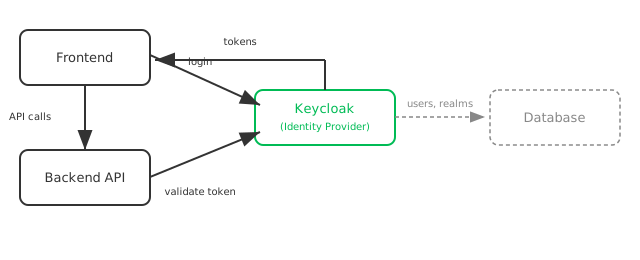
- The Frontend redirects the user to Keycloak to log in, and receives tokens back.
- The Backend API never handles passwords — it only validates tokens it's handed, against Keycloak.
- Keycloak owns users, realms, and clients, and persists them in its own database — a detail your apps never need to know about.
This is the shape every part of this crash course builds toward: by Part 7, the "Backend API" box above is a real, running NestJS app.
6. What We'll Build
By the end of this hour, you will have:
- Keycloak running locally in Docker
- A realm, a client, and a test user, created by hand in the Admin Console
- A working understanding of the OAuth 2.0 Authorization Code flow and how OpenID Connect layers authentication on top of it
- A decoded, real Keycloak access token, and an understanding of every claim in it
- A NestJS API with a public route, a token-protected route, and a role-protected route — validating real Keycloak-issued JWTs
7. Beginner Pitfalls
- Assuming Keycloak is only for large enterprises. It runs fine in a single Docker container for local development — the same series you're reading sets it up that way.
- Confusing an Identity Provider with a database of passwords. Keycloak stores credentials, but its actual job is issuing and validating tokens — your apps interact with tokens, never passwords.
- Expecting this crash course to cover every Keycloak feature. It covers exactly what's needed for one protected API — see Part 8 for what's deliberately out of scope.
Buy Me a Coffee
Found this tutorial helpful? Consider buying me a coffee to support more free content!