Docker Sandbox Concept
Table of Contents
- What is Docker Sandboxes?
- What it's actually built for
- Why we're using shell mode
- Sandbox vs your local machine
- Containers and isolation
- Where it fits in the Docker ecosystem
- Common use cases
- Beginner Pitfalls
1. What is Docker Sandboxes?
Docker Sandboxes creates isolated
sandbox environments powered by Docker. Each sandbox is a microVM — a
lightweight, hypervisor-isolated virtual machine — with its own filesystem,
its own network, and its own Docker daemon. You manage sandboxes with a
standalone CLI called sbx.
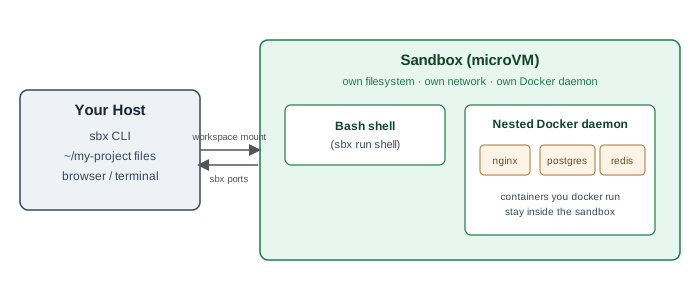
- Your host shares one directory (a workspace) into the sandbox — the sandbox sees your real files, edited in real time, no sync step.
- Everything else — installed packages, pulled images, running containers — lives inside the sandbox's own disk and is gone the moment you remove it.
- Nothing reaches your host's Docker daemon, your host's network, or the rest of your filesystem unless you explicitly publish a port or mount an extra directory.
2. What it's actually built for
Here's the part worth being upfront about: Docker positions Docker Sandboxes as isolation for AI coding agents — Claude Code, Gemini CLI, Codex, Copilot, Cursor, Devin, and a handful of others. The pitch is straightforward: an autonomous agent might run arbitrary shell commands, install packages, or build and run containers while it works. You don't want to hand that much power to code you didn't write and can't fully supervise, directly on your host. A sandbox gives the agent a full Linux environment with its own Docker daemon — so it can do real work — while keeping your host, your other projects, and your credentials out of reach unless you deliberately share them.
That's genuinely useful, and we'll come back to it in Part 9. But it's not what this course is about.
3. Why we're using shell mode
sbx run accepts an agent name as its first argument — claude, gemini,
and so on — but it also accepts a special value: shell. Running
sbx run shell drops you into a plain Bash login shell inside a sandbox, with
no AI agent attached at all. It's a first-class, documented mode, meant for
"installing and configuring agents manually, testing custom implementations,
or inspecting a running environment" — but nothing stops you from just...
using it as a disposable Linux box with Docker built in.
That's exactly what this course does. Everything from Part 2 through Part 8
happens inside one shell-mode sandbox. You get:
- A real, isolated Linux environment you can break without consequences.
- Its own Docker daemon, so
docker pull/docker runwork exactly like they would on a dedicated Linux server. - A one-command teardown (
sbx rm) when you're done — no leftover containers, images, or config on your host.
4. Sandbox vs your local machine
| Your local machine | A sandbox | |
|---|---|---|
| Filesystem | Everything you own | Only the workspace you mount, plus its own disk |
| Docker daemon | Your one host daemon — docker ps sees everything | A private daemon — containers here never appear in your host's docker ps |
| Network | Full access | Routed through a host-side proxy; blocked by default beyond common dev traffic |
| Breaking something | Affects real projects, real config | sbx rm deletes it entirely, host untouched |
| Startup cost | Already running | A few seconds (image cached after first run) |
The practical effect: you can apt-get install something questionable,
misconfigure a database, or run a script you don't fully trust — and the
worst case is sbx rm and starting over.
5. Containers and isolation
It helps to keep three layers straight, because the words "container" and "sandbox" both mean "isolated," but at different levels:
- Container — an isolated process on a Docker daemon: its own filesystem view and namespaces, but sharing the host kernel and daemon.
- Sandbox — an isolated machine (a microVM): its own kernel, its own Docker daemon, its own network stack. A sandbox can run many containers inside it, and those containers are isolated from each other the normal Docker way — and the whole sandbox is additionally isolated from your host.
- Host — your actual machine, running the
sbxCLI and the sandbox daemon (sandboxd) that manages the microVMs.
So a container run inside a sandbox is isolated twice over: once by Docker from other containers in the same daemon, and once by the sandbox's hypervisor from your host and everything else on it.
6. Where it fits in the Docker ecosystem
Docker's own docs frame the choice like this:
| Approach | Isolation | Docker access | Typical use case |
|---|---|---|---|
| Sandboxes (microVM) | Full (hypervisor) | Isolated daemon | Autonomous agents (and, in this course, safe learning/experimentation) |
| Container with socket mount | Partial (namespaces) | Shared host daemon | Trusted tools |
| Docker-in-Docker | Partial (privileged) | Nested daemon | CI/CD pipelines |
| Host execution | None | Host daemon | Manual development |
Sandboxes trade some resource overhead (a VM plus its own daemon) for isolation the other approaches can't match. That overhead is a fine price to pay for a learning environment you're going to intentionally break.
7. Common use cases
For this course, we'll lean on the sandbox for:
- Learning Docker — running real
dockercommands without any risk to your host's containers, images, or volumes. - Testing commands — trying a destructive-looking flag or an unfamiliar command without a second thought.
- Experimenting safely — installing packages, editing config files, and generally poking at a Linux box the way you would a VM you don't care about.
- Trying unfamiliar environments — a clean Ubuntu-based environment,
reset to zero every time you
sbx rmandsbx runagain.
8. Beginner Pitfalls
- Don't confuse
sbxwithdocker.sbxmanages sandboxes (the VMs);docker, run inside a sandbox, manages containers the normal way. - The old
docker sandboxcommand (a Docker Desktop plugin) is deprecated. If you see it in older tutorials or blog posts, it no longer applies — use the standalonesbxCLI instead.
Buy Me a Coffee
Found this tutorial helpful? Consider buying me a coffee to support more free content!