Docker Fundamentals
Table of Contents
- Docker Architecture & Docker Engine
- Images vs. Containers
- Registries & Docker Hub
- Persisting Data with Volumes
- Docker Networks
- Basic Docker Workflow
1. Docker Architecture & Docker Engine
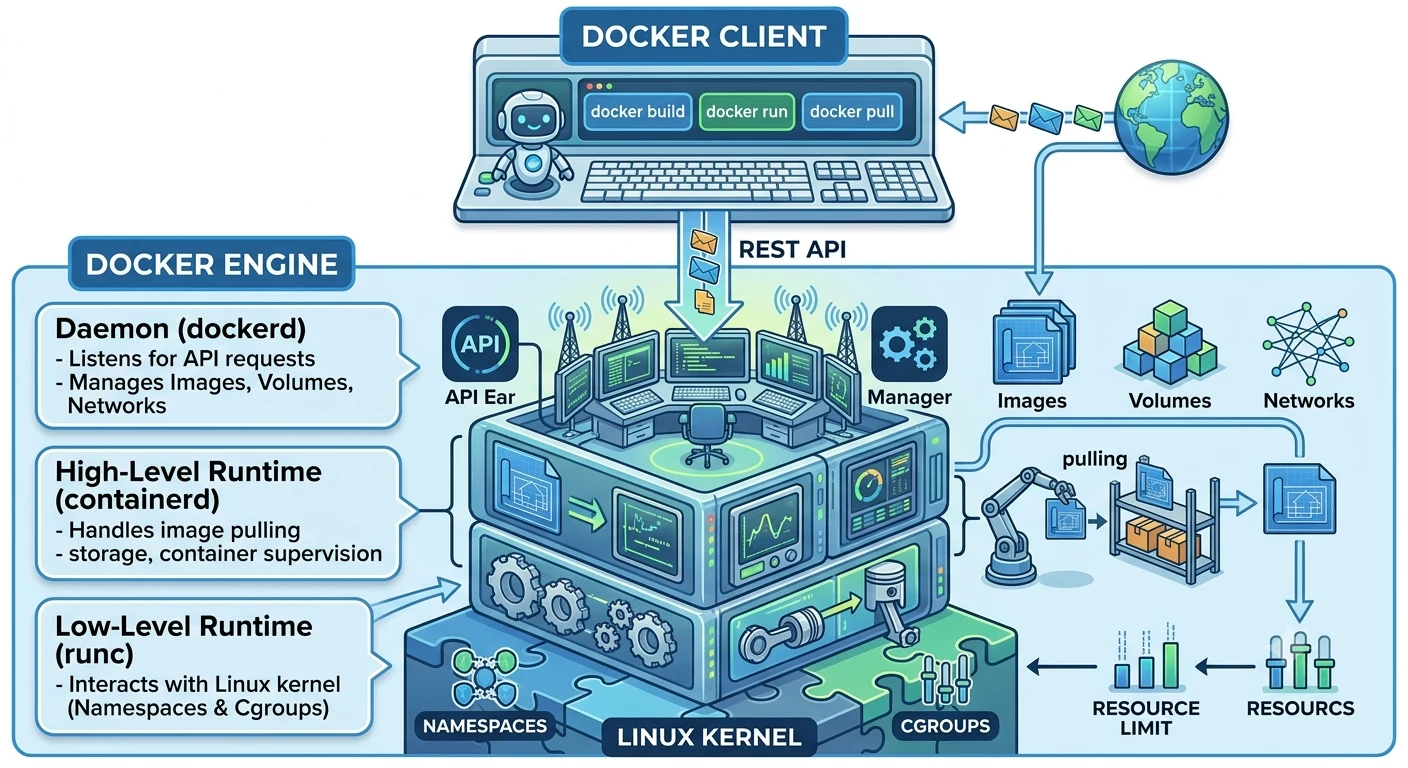
Docker uses a client-server model. The command-line interface communicates with the background daemon through a REST API over a Unix socket or network interface.
-
Docker CLI (
docker): The terminal tool you interact with to issue commands. -
Docker Daemon (
dockerd): The primary host service that listens for API requests and manages Docker objects. -
containerd & runc: The underlying container runtimes.
containerdhandles image management and lifecycle execution, whileruncinteracts directly with Linux kernel primitives (Namespaces for isolation and Cgroups for resource limits).
2. Images vs. Containers
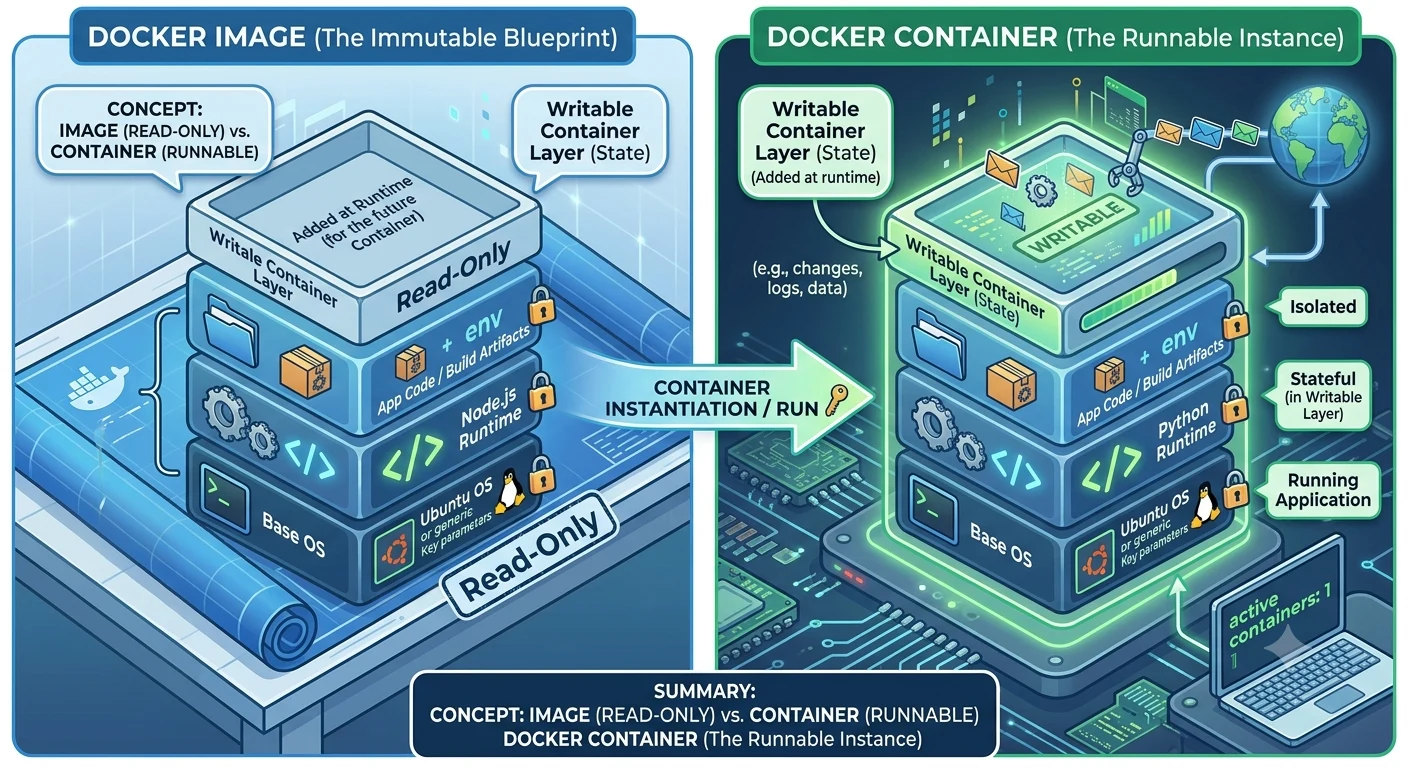
To understand Docker objects, think of an Image as a class definition and a Container as an active instance of that class.
-
Images (Read-Only): Immutable, layered blueprints consisting of a base OS layer, dependencies, and application code.
-
Containers (Read-Write): Ephemeral execution environments. When a container starts, Docker adds a thin Writable Layer on top of the image stack using a unified filesystem (like OverlayFS).
3. Registries & Docker Hub
A Docker Registry is a centralized storage and distribution system for Docker images.
          docker push                        docker pull
Developer ------------>  DOCKER REGISTRY   ------------> Production / Teammate
                         (e.g., Docker Hub)
-
Docker Hub: The default public registry hosted by Docker Inc., containing thousands of official, verified base images (e.g.,
postgres,nginx,node,redis). -
Private Registries: Enterprise environments often host private registries on AWS ECR, GitHub Container Registry (GHCR), or Azure Container Registry (ACR) to secure proprietary application images.
4. Persisting Data with Volumes
By default, data inside a container is ephemeral—if the container is deleted, its writable layer and data disappear. Docker provides Volumes and Bind Mounts to persist data outside the container lifecycle.
| Storage Type | Managed By | Path on Host | Primary Use Case |
|---|---|---|---|
| Named Volume | Docker Engine | Managed folder inside Docker storage | Databases, persistent state (Recommended) |
| Bind Mount | User | Anywhere on the host filesystem | Live development (hot reloading) |
# Create and run a Postgres container with a named volume
docker volume create postgres_data

docker run -d \
  --name my-db \
  -v postgres_data:/var/lib/postgresql/data \
  postgres:16
5. Docker Networks
Containers run isolated from the host network by default. Docker uses network drivers to enable communication between containers and external resources.
-
Bridge (Default): Creates a private internal network on the host. Containers on the same bridge network can communicate with each other using container names as hostnames.
-
Host: Removes network isolation between the container and the Docker host (the container shares the host's network interfaces directly).
-
None: Disables all networking for complete isolation.
# Create a custom bridge network
docker network create app-net

# Run containers on the same network so they can communicate
docker run -d --name redis-cache --network app-net redis
docker run -d --name web-api --network app-net -p 8080:8080 my-web-api
6. Basic Docker Workflow
The day-to-day developer workflow follows three core commands: Build, Run, and Manage.
[ Dockerfile ] --( docker build )--> [ Docker Image ] --( docker run )--> [ Active Container ]
Essential Commands Cheat Sheet
# 1. Pull an image from Docker Hub
docker pull nginx:alpine

# 2. Run a container in detached mode (-d) with port mapping (-p host:container)
docker run -d --name web-server -p 80:80 nginx:alpine

# 3. List running containers
docker ps

# 4. View container logs
docker logs -f web-server

# 5. Execute an interactive shell inside a running container
docker exec -it web-server sh

# 6. Stop and remove a container
docker stop web-server
docker rm web-server
Buy Me a Coffee
Found this tutorial helpful? Consider buying me a coffee to support more free content!